

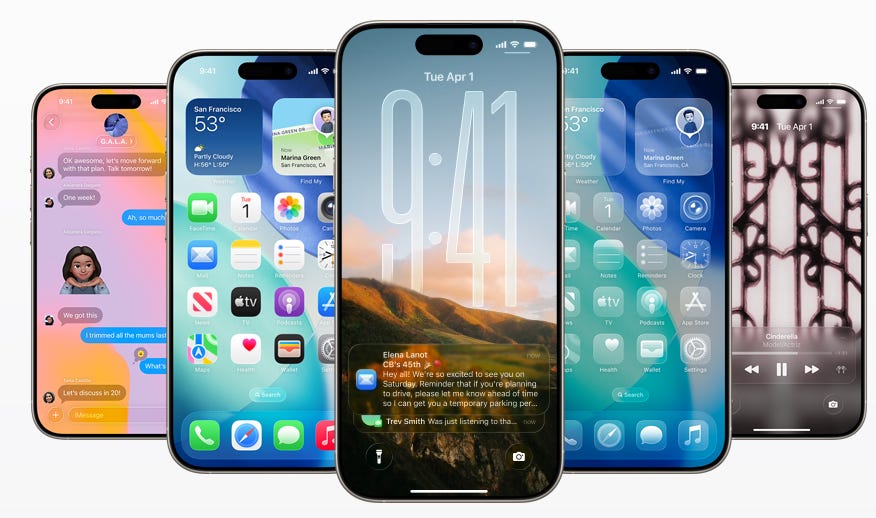
Apple has officially previewed iOS 16, the next major update to the iPhone operating system, which brings a mix of visual refreshes, practical improvements, and deeper system integration. While the update may not be revolutionary, it offers several quality-of-life improvements that could make everyday use feel smoother and more refined for over a billion iPhone users.
Here’s a detailed breakdown iOS 26 you’ll actually care about, and why it matters.
Visual Changes: “Liquid Glass” Design
iOS 26 introduces a new design language Apple is calling “Liquid Glass.” It features smoother transitions, curved edges, translucent surfaces, and subtle depth effects across the interface.
According to LaptopMag.com, The updated visual style is heavily inspired by the company’s spatial computing ambitions and follows the aesthetic direction introduced by devices like the Vision Pro.
Users will also notice more motion and animation on the lock screen and home screen, with photo-based wallpapers gaining depth and a three-dimensional effect that brings a new layer of polish to the experience.
Call Screening Arrives on iPhone
One of the standout features in iOS 26 is a new form of call screening. When a call comes in from an unknown number, the caller will be asked to say who they are and why they’re calling. This short message is transcribed and displayed on the lock screen, allowing users to decide whether to answer, decline, or block the call, without the phone ever ringing.
This feature is designed to curb spam and robocalls, which continue to be a significant nuisance for smartphone users.
According to TechCrunch, Call Screening lets you “determine what a call is about before picking it up. When you get a call from an unknown number, Call Screening will automatically answer silently in the background. When the caller shares their name and the reason for their call, the iPhone will ring, and you can view their response before deciding whether to pick up or ignore it.”
Messages App Gets Smarter and More Interactive
The Messages app gains more robust filtering for unknown senders, which should help eliminate scam texts and unwanted solicitations. In addition, group chats can now include interactive polls, making it easier for users to plan events or make group decisions. Animated and customizable backgrounds add a personal touch to conversations.
As MacRumors explains, “iOS 26 allows users to set custom backgrounds in conversations, and it introduces the ability to create polls for voting. In the Messages app, users can now screen messages from unknown senders. These messages will remain silenced until a user accepts them. In group chats, users can now see typing indicators, plus send and receive Apple Cash. A new Live Translation feature in the Messages app, powered by Apple Intelligence, can translate text and audio on the fly.”
Hold Assist for Customer Service Calls
Another subtle but smart addition is “Hold Assist.” When users call a company and are placed on hold, the iPhone can detect hold music and offer to monitor the call. Once a live agent picks up, the phone alerts the user so they can return to the call. This hands-free approach to waiting on hold could become a widely appreciated feature.
TechCrunch explains this by saying, “In iOS 26, when you receive a call from an unknown number, call screening will automatically answer silently in the background once the caller shares their name and the reason for their call. Your iPhone will ring, and you can view their response before deciding whether to pick up or ignore the call.”
Simplified Camera and Redesigned Photos App
The camera interface in iOS 26 has been simplified. Users are presented with just two main options: photo and video, making the experience more straightforward. Additional camera modes are still available but are hidden until needed.
The Photos app also returns to a tabbed interface, with one tab displaying the entire photo library and another surfacing curated collections. This brings back a more familiar and functional navigation model that many users had missed.
9to5Mac had this to say regarding the camera and photo app, “The main camera screen will prioritize Photo and Video modes. Additional capture options (such as Cinematic, Portrait, and Slo‑Mo) will still be available, of course, but will be accessed by swiping left or right. Swiping up within a mode will reveal relevant settings like Exposure, Timer, and Aperture.”
“Resolution and frame rate controls have been moved to the top of the screen, alongside toggles for Flash and Night Mode. As Apple explained, the redesigned layout aims to reduce visual clutter while keeping advanced tools within reach.”
New Features in Maps and Live Translation
Apple Maps in iOS 26 will now maintain a searchable list of frequently visited places. While this feature could be helpful for navigation, privacy-conscious users will have the option to disable it.
Live translation features are also expanding across system apps, including Messages, FaceTime, and phone calls, allowing for real-time multilingual communication.
MacRumors describes these updates, “Apple Maps is getting an upgrade to understand your commute better, and proactively offer recommendations based on traffic. Your iPhone will now learn your preferred commute, and the routes you often take to go home, to work, or to pick your kids up from school.
“If there’s traffic on a common route you take, your iPhone will proactively alert you. iPhone users will also be able to enable their iPhone to remember the restaurants or shops they travel to. Users can easily delete visited places with a swipe, and the information is protected with end‑to‑end encryption.”
Visual Intelligence and Accessibility Enhancements
Apple’s new “Visual Intelligence” tools allow users to copy and search text within images, identify items in photos, and perform actions based on on-screen content. While not as advanced as similar Android offerings, it represents a move toward more contextual awareness.
Accessibility also gets attention in this update, with improvements to braille support, a new Accessibility Reader, and enhanced “Live Listen” capabilities that turn the iPhone into a remote microphone for AirPods or hearing aids.
Mac Rumors goes into a little more detail. “In iOS 18, Visual Intelligence only works with the camera, but in iOS 26, it also works with what's on your device. You can capture a screenshot of what's on your screen and then use Visual Intelligence on it to identify what you're looking at, find images, and get more information through ChatGPT.
“Highlight to Search lets you conduct an image search for a specific object in a screenshot, even if there are multiple things in the picture. It uses Google Image Search by default, but Apple showed off the feature working with other apps like Etsy during its keynote event.”
“If you don't need to isolate one object in your screenshot, you can simply tap on the Ask button to ask questions about what you're seeing. Questions will be relayed to ChatGPT, and ChatGPT will provide the information. The Search button queries Google Search for more information.”
Updates to Apple Watch
WatchOS updates include a new AI-powered workout assistant that offers personalized motivation based on previous activity. For example, the watch might encourage a user to walk just a little farther to beat a personal record.
There’s also a new wrist gesture, rotating the wrist, to dismiss notifications or return to the home screen without needing to tap the screen.
According to TechCrunch, “WatchOS 26 will launch with a redesigned interface based on Apple’s new Liquid Glass operating system. The new wrist‑flick gesture can be used to dismiss notifications that you want to address later. You can also use a flick of your wrist to mute incoming calls and silence timers and alarms.”
“With watchOS 26, Apple Watch will also be able to intercept the ambient noise in your environment and automatically adjust the volume of incoming calls and notifications better.”
Device Compatibility and Release Timeline
iOS 26 will be available for the iPhone 11 and newer, as well as the second-generation iPhone SE (2020). However, many of the new AI-driven features will require an iPhone 15 Pro or later. A public beta is expected in July, with the final release scheduled to roll out with new iPhone models in September.
MacRumors mentions that “the likely release window [is] between September 8–22, 2025. iOS 26 drops support for the iPhone XR, iPhone XS, and iPhone XS Max, making it the first major iOS release to exclude these 2018 models.”
“Compatible devices include: iPhone 11 series, the iPhone 15 series, and the iPhone 16 series. While these iPhones will run iOS 26, advanced features may be limited to newer models with faster processors. Apple Intelligence features, for instance, currently require an iPhone 15 Pro or iPhone 16 series device.”
Final Thoughts
Many of iOS 26’s features are iterative rather than groundbreaking. However, taken together, they reflect a shift in Apple’s focus toward more context-aware, user-friendly enhancements that address common pain points, including spam calls, group planning, accessibility, and multitasking.
While Android users may recognize some of these capabilities from their own devices, Apple’s implementation is built around integration and polish. For iPhone users, iOS 26 offers a meaningful set of upgrades, especially for those who’ve been waiting for Apple to catch up in key areas like call screening and device intelligence.